01
Copy the Video Link
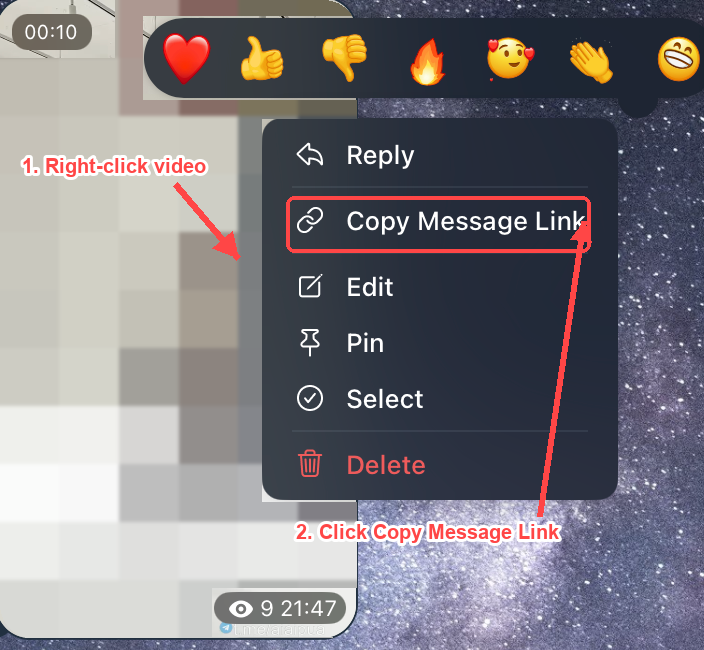
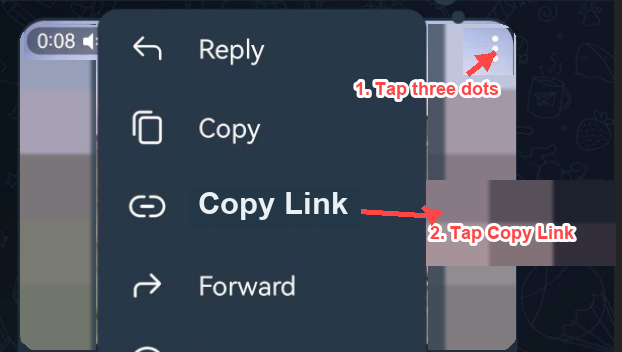
Open Telegram, find the video you want to save, and copy the message link or video link from the share menu. If the channel does not allow copying links, move to the private-channel solutions below.
Save Telegram private channel videos with an easy downloader guide. Download accessible videos and media, troubleshoot failed downloads, and find the right method for your device.
Continue this telegram video download in TG Downloader
Open the message in Telegram Web and keep the telegram video download moving with TG Downloader for files, albums, or private-channel saves.
Install TG DownloaderMost users searching for a Telegram private video downloader are trying to solve one of these problems:
| Your situation | Try this first |
|---|---|
| You have a Telegram video link from a channel or chat | Paste the link into an online Telegram video downloader |
| You can watch the video in a private channel but cannot save it | Try Telegram Desktop's Save Video As option |
| The video plays, but downloading and forwarding are blocked | Use screen recording only if you have permission to keep a copy |
| The downloader says no video found | Check access, link type, channel restrictions, and whether the video opens outside Telegram |
The fastest route is a link-based Telegram video downloader. It works best when the Telegram video link is public, accessible, or readable outside the Telegram app.
Open Telegram, find the video you want to save, and copy the message link or video link from the share menu. If the channel does not allow copying links, move to the private-channel solutions below.
Paste the Telegram link into the downloader field. The tool checks whether a downloadable video file can be reached from that link.
Choose the available quality or format, then save the Telegram video directly to your phone, tablet, or computer. If no file appears, the link is probably restricted rather than broken.
A private Telegram video usually means a video shared in a private channel, private group, or direct chat. These videos are visible only to approved members, so downloading them is different from saving media from a public channel.
Quick answer: If the link is accessible, use an online Telegram private video downloader. If the video is visible only inside Telegram, try Telegram Desktop. If saving is blocked but you are allowed to keep the content, screen recording may be the practical fallback.
Best for accessible Telegram links. This is the simplest method for users who want to download Telegram videos online without installing an app, extension, or bot.
Use this method when:
When the video is available in Telegram Desktop and downloads are allowed, right-click the video and save it to a folder on your computer. This often works better for private-channel members because you are already authenticated inside Telegram.
Use this method when:
If the download option is disabled but you are permitted to view and keep the content, a screen recorder can capture the video and audio while it plays. This is a fallback, not the first method, because it takes longer and depends on playback quality.
Use this method when:
In some Android cases, Telegram may temporarily store loaded media in local app folders. A file manager can sometimes help you find videos that have already been loaded on the device, but this depends on app version, storage permissions, and cache behavior.
Use this method when:
A good downloader should help you answer one question quickly: can this Telegram video be saved from the link I have? The best experience is direct, clear, and honest when a private link cannot be processed.
Keep Telegram videos in the best available quality for offline playback, study, training, archiving, or personal reference.
Use the downloader from a browser on Android, iPhone, Windows, Mac, or tablet. This matters when the video is on your phone but you want to save it to another device.
Choose tools that process a video link without asking for your Telegram password, verification code, session file, or private account credentials.
Download files in common video formats when available, so you can watch later without opening Telegram or using mobile data.
Copy, paste, analyze, and download. If the link fails, the page should explain why and tell you what to try next.
Download only videos you have the right to access and save. Respect channel rules, creator rights, and Telegram's policies.
Not every failed link means the downloader is broken. Private Telegram videos often fail because the file is not available outside Telegram. Try this checklist:
| Situation | Recommended Solution | Best For | What to Check |
|---|---|---|---|
| Public or accessible Telegram video link | Online Telegram video downloader | Fast HD download without an app | The link opens and the video can be reached by the tool |
| Private channel video with download allowed | Telegram Desktop Save Video As | Saving directly to a computer | You are a member and the owner has not disabled saving |
| Restricted saving but visible playback | Built-in or third-party screen recorder | Personal offline reference with permission | Audio capture, screen area, and local laws or platform rules |
| Android cached media | File manager check | Finding media already loaded on the device | App storage access and whether Telegram keeps a local cache |
Download TikTok videos without watermark in HD quality.
Download X/Twitter videos and GIFs in HD quality.
Download Vimeo videos in HD with multiple resolution options.
Download Instagram photos, Reels, and carousels in HD quality.
Download Threads videos and photos in original quality.
FAQ
The questions people ask before a telegram video download or telegram file download in Telegram Web.
You can only download or save private Telegram videos when you have permission to access them and the video source is available. Some private channels block saving, forwarding, copying links, or external access.
Try the link-based downloader first if you have a usable Telegram video link. If that does not work, check Telegram Desktop for a Save Video As option. If downloads are blocked but you are allowed to keep the content, screen recording may be the fallback.
The link may be restricted, deleted, expired, visible only inside Telegram, or blocked by the channel owner. Open the link yourself first and confirm the video still plays. If it works only after you log in to Telegram, an online downloader may not be able to access it.
No for accessible links. An online Telegram video downloader works in a browser. You may need Telegram Desktop, a file manager, or a screen recorder for specific private or restricted cases.
Usually no. Online downloaders need a Telegram video link to locate the file. If you cannot copy a link but can watch the video in Telegram, use Telegram Desktop or another permitted local method.
No. A downloader should not need your Telegram password, verification code, or session credentials. If a site asks for them, leave the page.
Many link-based Telegram media downloaders are free for basic downloads. Avoid tools that force suspicious installs, login requests, or misleading buttons.
It depends on the content, your permission, and your intended use. Do not download or redistribute copyrighted, private, or restricted content without authorization.