HD Original Quality
Download Vimeo videos in their full HD resolution. Get the same crisp quality that the creator uploaded.
Paste any Vimeo video link to download in HD quality with resolution selection. Also supports Telegram, TikTok, and X links.
Continue this telegram video download in TG Downloader
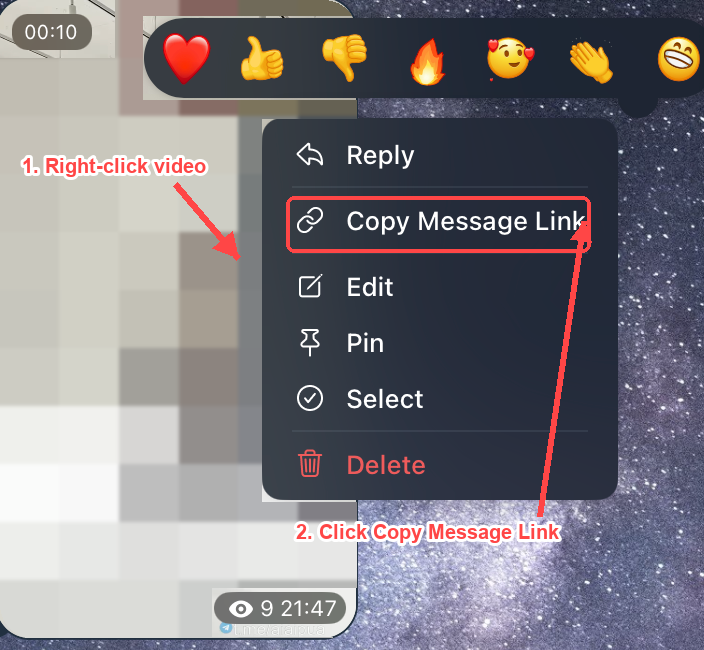
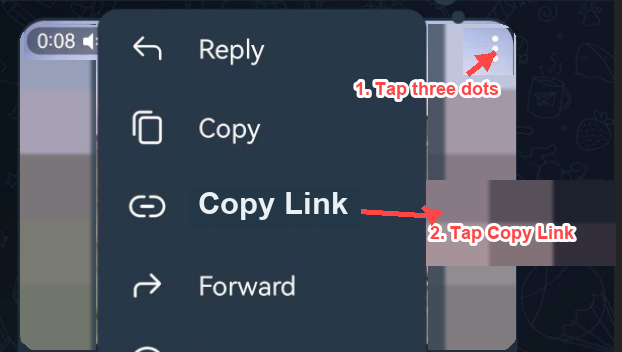
Open the message in Telegram Web and keep the telegram video download moving with TG Downloader for files, albums, or private-channel saves.
Install TG DownloaderSave Vimeo videos in HD quality with your choice of resolution, completely free.
Download Vimeo videos in their full HD resolution. Get the same crisp quality that the creator uploaded.
Choose from available resolutions (360p, 720p, 1080p, and more). Pick the quality that fits your needs.
No app install, no account needed. Paste the Vimeo link, select your resolution, and download instantly.
Three simple steps to save any Vimeo video with your preferred resolution.
Open the Vimeo video page and copy the URL from your browser address bar.
Paste the copied Vimeo URL into the input field and click Parse.
Select your preferred video resolution and click Download to save the HD video.
FAQ
Copy the Vimeo video page URL, paste it into the input field above, click Parse, then select your preferred resolution and download.
Yes. After parsing, you can choose from all available resolutions including 360p, 720p, 1080p, and higher when available.
Yes, completely free to use. Download Vimeo videos in HD quality without any cost or registration.
No account needed. You can download any public Vimeo video without logging in.
Vimeo videos are downloaded in MP4 format, which is compatible with virtually all devices and players.
Download TikTok videos without watermark in HD quality.
Download X/Twitter videos and GIFs in HD quality.
Download Instagram photos, Reels, and carousels in HD quality.
Download Threads videos and photos in original quality.
Download Telegram videos from channels and groups in HD quality.